
 English
 Deutsch
Reduce Ecommerce Returns: Product Image Mistakes
August 13, 2026
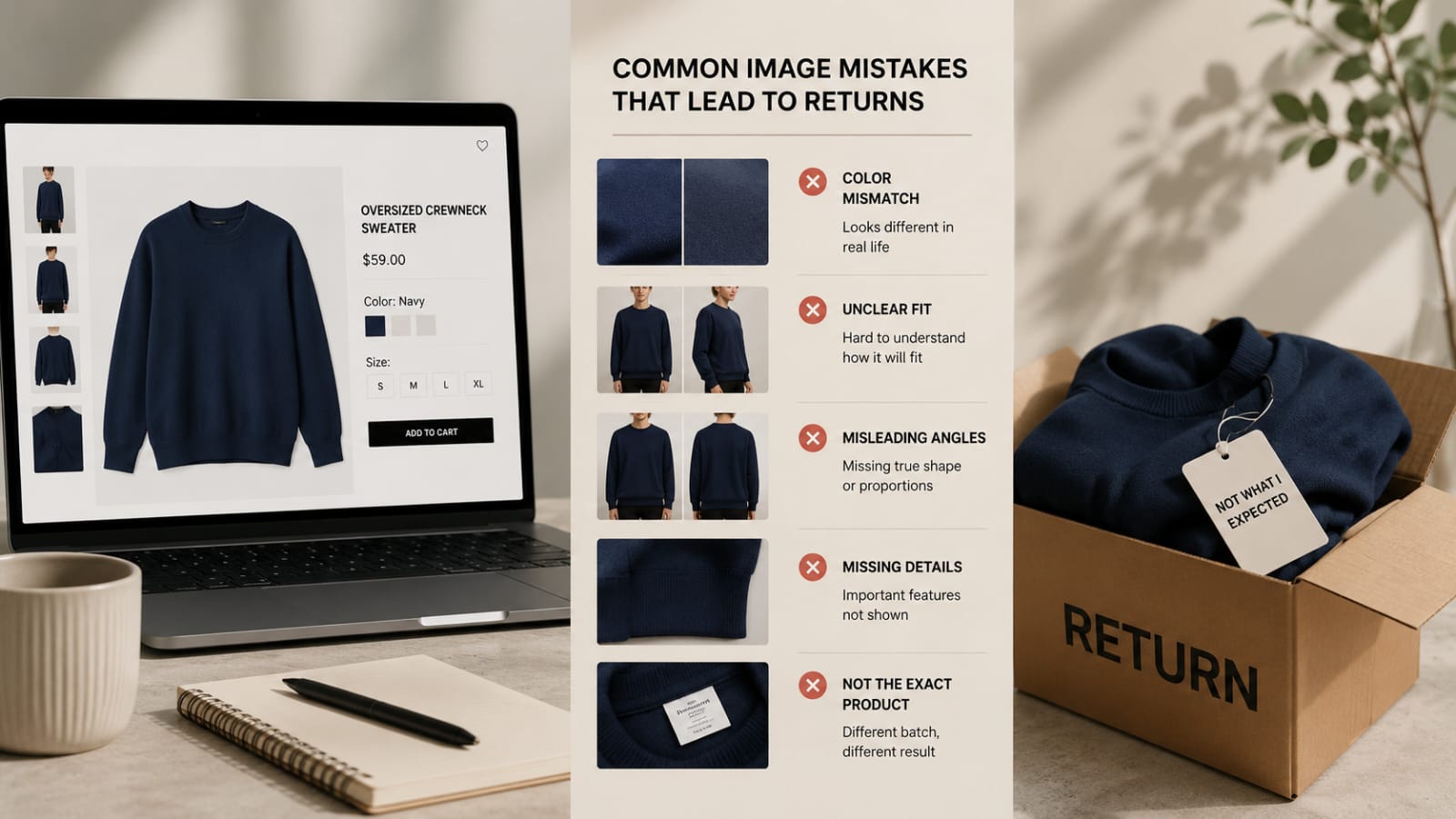
Returns are expensive. A $30 garment costs you shipping, processing, and lost margin if you can't resell it. One returned item nets a loss. A high return rate decimates profitability.
The irony is that many returns are preventable. Customers don't return because the product is bad. They return because the image didn't match reality. When you reduce ecommerce returns through better product images, you recover thousands in prevented losses.
Inaccurate photos, confusing angles, poor color representation, and unclear fit create expectation gaps. The customer receives something different from what they imagined. Back it goes.
This guide breaks down the product image mistakes that drive returns and how to fix them.
The True Cost of Returns
Before diving into prevention, understand the full cost of a single return:
Shipping cost to customer (often subsidized or free). Return shipping cost. Processing and restocking labor. Lost sale margin. Potential product damage in transit (can't resell). Reputational damage from negative reviews.
A single $50 return costs you significantly in direct costs. If 20% of customers return, you're losing a notable percentage of profit. If 30% return, you're bleeding money.
Every image improvement that reduces returns by even 1 to 2% pays for itself quickly.
How to Reduce Ecommerce Returns Product Images
Product image quality directly affects customer satisfaction. Poor images create false expectations. When the product arrives different from what the photo promised, the return is almost guaranteed.
Mistake 1: Colors Don't Match the Real Product
This is the top reason customers return fashion items. A navy blue shirt looks purple in the photo. A gray sweater looks charcoal. A white background shows the garment in cool light, but it arrives looking warmer or more saturated.
Color inaccuracy happens because of wrong lighting during photography, incorrect white balance, uncalibrated monitors during editing, JPEG compression distortion, or customer viewing on poor-quality screens.
How to fix it: Shoot under daylight-balanced lighting. Set white balance correctly in your camera or shoot RAW and adjust later. Use professional color correction in post-production to match the garment's actual color. Display the real garment next to the photo while editing to verify. Include a note that colors may vary slightly depending on screen accuracy.
Professional color correction ensures images match the physical product. This single step reduces returns dramatically.
Mistake 2: Fit Is Unclear (Photos Don't Show How It Actually Fits)
Customers buy clothes based on how they'll fit their body. If the photo doesn't make fit clear, they guess wrong.
A shirt might fit slim, regular, or oversized. A ghost mannequin photo shows this. A flat lay doesn't. An on-model photo shows fit on one specific body type, which may not match the customer's.
Unclear fit happens because photos show only flat lays or hanging shots, not on-body. Photos use a model that doesn't represent the typical customer. The garment isn't properly steamed or adjusted to show true shape. No size comparison or measurement reference is provided.
How to fix it: Include ghost mannequin shots to show 3D fit. Include on-model photos with multiple body types if possible. Provide accurate measurements (chest width, length, sleeve length) alongside photos. Show the garment on a consistent mannequin size across your catalog. Include fit descriptions like "This runs true to size" or "This fits oversized. We recommend sizing down."
The combination of ghost mannequin, on-model, and clear measurements reduces fit-related returns significantly.
Mistake 3: Angle and Perspective Are Misleading
A garment photographed from above looks shorter and wider. Photographed from below, it looks longer and narrower. An angled shot distorts proportions.
If the customer can't see the actual shape because of unflattering angles, they order expecting something different.
How to fix it: Shoot front and back from straight-on angles, not angled. Shoot at the garment's true proportions. Include multiple angles (front, back, side, detail close-ups). Avoid extreme overhead or below shots unless intentional.
Consistent, straight-on angles look professional and honest.
Mistake 4: Photos Show a Different Color or Style Than You're Selling
This happens when you mix product photos or use reference images that aren't your actual inventory.
A photo shows the garment in navy, but you're selling black. Or the sample photo is from the factory, but your production batch is slightly different.
Customers are disappointed the moment they open the box.
How to fix it: Photograph your actual inventory, not samples. If you use factory photos, note that color may vary or re-shoot with your production batch. Ensure photos match the exact SKU and color being sold. Photograph each color separately.
Honesty and consistency prevent returns.
Mistake 5: Photos Don't Show Important Details
A pocket, hem, seam, zipper, label, or stitching detail could matter to your customer. If photos don't show it, they might be surprised.
A dress with a hidden pocket is a selling point. A shirt with reinforced seams shows durability. You don't know unless the photos show these details.
How to fix it: Include close-up shots of key details (cuffs, collars, seams, zippers, hems). Show the inside label, fabric content, and care tag. Highlight unique features (hidden pockets, adjustable straps, reversible design).
Detail shots build trust.
How Professional Image Editing Reduces Returns
Each of these mistakes is preventable with proper photography and professional editing.
Color correction ensures colors match reality. Retouching removes distracting wrinkles so fit is clear. Ghost mannequin compositing shows 3D fit without distortion. Background removal and consistent styling make all images cohesive. Detail shots and close-ups reveal quality and features.
Our color correction service ensures every image in your catalog matches your actual products, reducing customer disappointment and returns.
Professional editing isn't a luxury. It's a return-reduction tool. The investment in quality images pays back in lower return rates, higher customer confidence, and better repeat purchases.
Product Image Return-Reduction Checklist
- Colors in photos match actual products
- Fit is shown clearly (ghost mannequin, on-model, or both)
- Angles are straight-on and not misleading
- Photos show the exact product you're selling (not samples)
- Important details and features are visible in close-ups
- Measurements are provided alongside photos
- Fit descriptions are accurate
- All images in your catalog are consistent in quality
- No watermarks or logos overlay the product
- Background is clean and professional
FAQ
Q: How much does color correction cost?
A: Costs vary depending on complexity and volume. It's one of the most cost-effective edits because it prevents returns and boosts conversions.
Q: Should I include fit size guides with product photos?
A: Absolutely. Measurements and fit descriptions are essential. Pair them with photos showing how the garment actually fits. Together, they eliminate most fit-related returns.
Q: Can I use the factory's product photos, or do I need to photograph everything myself?
A: Factory photos are a starting point, but they're often poor quality or not representative of your inventory. Re-photographing your stock ensures accuracy. If cost is an issue, photograph best-sellers and use factory photos for less popular items, but be transparent.
Q: How long does it take to see a reduction in returns after improving images?
A: Within 2 to 4 weeks. Customers ordering after you've updated images will have better expectations. You'll notice fewer complaints and returns within a month.
Returns aren't inevitable. They're often a symptom of information gaps. When images show color accurately, fit clearly, and details honestly, customers know what they're buying. Our color correction service ensures every image in your catalog matches your actual products, reducing returns and building customer trust. Test your product images with a free test batch to see how color accuracy impacts returns.
%401x.svg)


