
 English
 Deutsch
AI Image Retouching: Why AI Photos Still Need Work
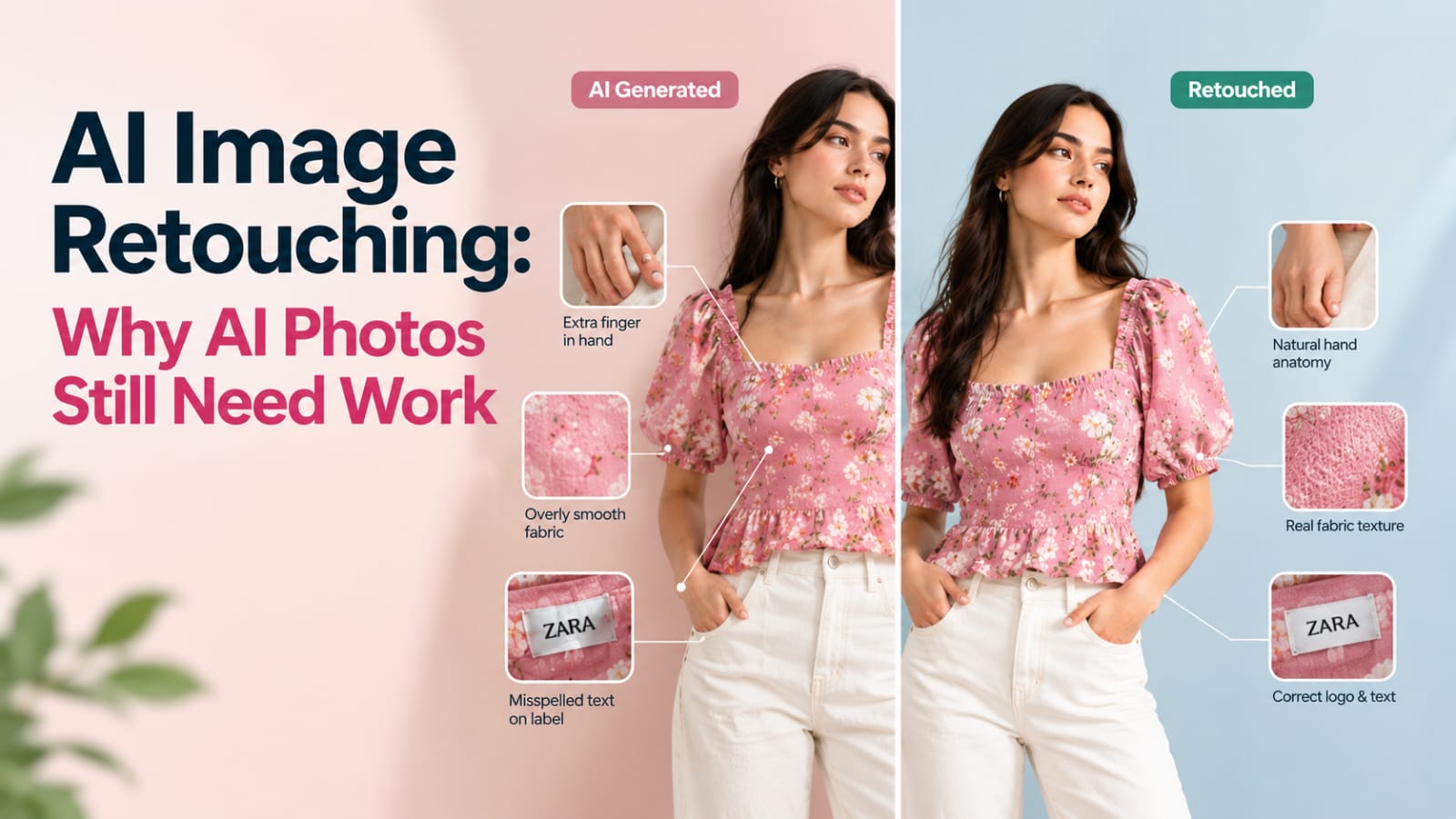
AI can generate a striking product image in seconds. Look closer, though, and the cracks start to show. A hand has six fingers. A logo is slightly misspelled. The fabric looks smooth where the real garment has a visible weave. A pocket appears where none exists.
This is why AI image retouching has become a necessary step in the workflow for many ecommerce and fashion brands. AI produces the starting point. Human retouching turns that starting point into an image that is accurate enough to publish and polished enough to sell.
This guide covers the common flaws in AI generated images, how human retouchers fix them, and why the hybrid model of AI generation plus human refinement makes sense for commerce.
Why AI Images Need Retouching Before They Sell
Ecommerce images have one job: help the customer make an accurate decision. An image that looks impressive but misrepresents the product fails that job.
AI generation optimizes for plausible-looking output. It doesn't check the image against a physical product. That gap is where errors appear. Details that the model guesses at may look convincing to the eye but be wrong for the item being sold.
Retouching closes that gap. A human retoucher compares the AI output against your reference photos and corrects what doesn't match. The result is an image that looks natural and represents the real product.
Retouching also handles consistency. AI output varies between generations. A retoucher brings each image into line with your catalog's color, lighting, and finish.
Common AI Image Flaws
Knowing where AI fails helps you know what to check.
Hands. AI often struggles with hand anatomy. Fingers may be the wrong number, bent at odd angles, or blend into the fabric. Hands are one of the first things viewers notice when they look wrong.
Text and labels. Care labels, size tags, printed graphics, and brand names are frequently distorted. Letters may be unreadable, misspelled, or replaced with lookalike shapes.
Logos and brand marks. A logo that is slightly off in shape, spacing, or color can create confusion about whether the product is authentic. This is a serious issue for brands with recognizable marks.
Fabric texture. AI tends to smooth fabric or invent a texture that doesn't exist. Knit, denim, linen, and fine weaves can look plasticky or generic. Sheen may be too high or too low.
Garment construction. Seams, buttons, zippers, pockets, collars, and hems can be added, removed, or repositioned. A jacket might gain a pocket or lose a button. These errors directly affect whether the customer receives what they expected.
Fit and drape. The garment may hang in a way the real fabric wouldn't. Proportions can shift, sleeves can change length, and the silhouette can drift from the original cut.
Color. Colors may be pushed warmer, cooler, brighter, or more saturated than the real product. Subtle shades like navy versus black or cream versus white are easy to miss in generation but obvious to a customer.
Backgrounds and edges. Halos, merged shapes, and blurry edges where the product meets the background make the image look unfinished.
How Human Retouchers Make AI Output Commerce-Ready
A retoucher works from both the AI output and the reference material. The reference might be a packshot, a flat lay, or detailed photos of the physical garment.
Compare against the source. The retoucher checks the AI image against the real product, looking at color, texture, construction, and proportions.
Correct hands and anatomy. Hands are rebuilt or refined so they look natural and match the pose. In some cases, the hand is cropped or repositioned to avoid the problem entirely.
Fix text and branding. Labels and logos are corrected to match the real product exactly. Incorrect characters are rebuilt, and marks are aligned to the correct placement.
Restore fabric detail. Texture is refined so the weave, knit, or finish matches the physical material. The retoucher avoids over-smoothing, which is one of the most common AI errors.
Align construction details. Missing or extra elements are removed or added to match the real garment. Seams, buttons, and pockets are placed where they actually sit.
Refine fit and drape. Silhouette and folds are adjusted so the garment looks like it would on a real body and matches the cut shown in your reference.
Match color and tone. Color is corrected against your reference, and the image is balanced with the rest of your catalog.
Clean edges and background. Halos are removed, edges are tightened, and the background is brought into line with your standard.
The Hybrid Model: AI Generation Plus Human Refinement
The hybrid model combines the strengths of both approaches. AI handles speed and variation. Humans handle accuracy and finish.
AI generates options quickly, letting you explore styling, poses, and environments without a full shoot.
A reference set grounds the work. Packshots and detail photos give the AI and the retoucher something accurate to measure against.
Retouching corrects the flaws. The final image is checked against the product and adjusted until it matches.
Quality control confirms the result. Images are reviewed for accuracy before they go live.
This model works well for secondary images, lifestyle visuals, and on-model concepts. For the most important product images, many brands keep a traditionally photographed hero and use the hybrid model for supporting views.
AI Image Retouching Quality Checklist
- Hands have the correct number of fingers and natural positioning
- Text and care labels are readable and accurate
- Logos match the real brand mark in shape, spacing, and color
- Fabric texture matches the physical material
- Seams, buttons, zippers, and pockets match the real garment
- Fit, proportions, and drape are consistent with the reference
- Color matches the physical product under neutral lighting
- Edges are clean with no halos or merged shapes
- Background matches the rest of the catalog
- Image has been compared side by side with the reference product
FAQ
Q: Can't AI models just get better and stop making these mistakes?
A: AI tools improve over time, and some flaws are reduced with each generation. However, accuracy to a specific physical product still depends on reference material and human verification. Even improved models can drift from the real item, so a review step remains important for commerce.
Q: How do I know if an AI image needs retouching?
A: Compare it with your physical product under neutral lighting. Check hands, text, logos, seams, fabric texture, and color. If any element looks different from the real item, it needs correction. Viewing the image at full zoom often reveals issues that are not visible at thumbnail size.
Q: Is retouching AI images expensive?
A: The cost varies with the number of flaws, the image complexity, and the level of accuracy you need. Light corrections are generally less expensive than rebuilding large areas. Ask for a test batch to understand the typical effort for your specific products.
Q: What information should I send to a retoucher along with AI images?
A: Send the AI output, the reference photos of the physical product, any close-up shots of details, and a short brief. Include notes on logo placement, color targets, and the level of retouching you want. Clear references make corrections faster and more accurate.
AI images can save time and expand what a brand can show, but they rarely arrive ready to sell. Hands, text, logos, fabric, and construction details all need a human check against the real product. The hybrid model of AI generation plus professional retouching gives you speed without sacrificing accuracy. Our AI generative model service can help you turn AI output into commerce-ready images. Test your own AI images with a free test batch to see the difference retouching makes.
%401x.svg)


