
 English
 Deutsch
Flat Lay to On-Model: AI Photo Guide
October 10, 2026
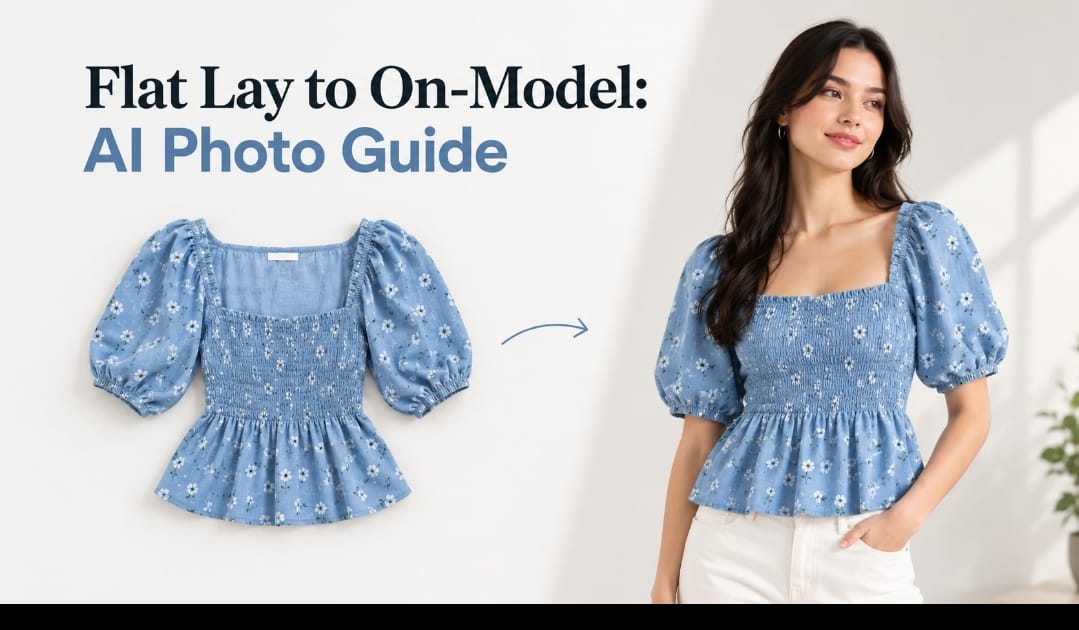
You have a flat lay photo of a garment. You have a packshot on a mannequin. You need on-model imagery but can't shoot it traditionally. This is where flat lay to on-model AI transformation becomes invaluable.
The process sounds simple: feed a product photo into an AI tool and it generates an on-model version. The reality is more nuanced. The quality of the input photo matters. The AI generation quality varies. Human retouching is usually needed to fix details, fabric accuracy, and fit.
This guide walks you through turning flat lays and packshots into on-model visuals using AI, what input photos work best, where human retouching fits, and how to maintain accuracy in the final image.
Why Flat Lay to On-Model AI Matters
Traditional on-model photography is expensive. You need models, studio, stylists, and photographer. Not every brand can do this for every product.
Flat lay to on-model AI lets you create on-model imagery from product photos you already have. If you've shot your garment flat or on a mannequin, you have a starting point.
The speed is a major advantage. Turning a flat lay into an on-model image takes days, not weeks. This is critical for fast-moving inventory, seasonal drops, or filling gaps in your catalog quickly.
The cost is significantly lower than traditional photography. You're using existing product photos and AI generation, not booking models and renting studios.
The flexibility is valuable. You can show the garment on different body types, in different sizes, and in different contexts without reshooting.
For brands managing hundreds of SKUs, flat lay to on-model transformation is practical and efficient.
What Flat Lay to On-Model AI Actually Does
AI doesn't photograph. It generates. Here's what happens:
You provide an input photo. This is usually a flat lay (garment laid flat), a packshot (on a mannequin), or a close-up product photo.
The AI analyzes the garment. It understands the shape, color, texture, and details from your input photo.
The AI generates a new image. It creates a visualization of that garment worn on a model. The AI synthesizes body, pose, and environment.
The output is a new image that shows the garment on a person. The quality depends on the AI tool, your input photo, and your prompt.
The result is not a photograph. It's a generated image. It may look realistic, but it's AI-created, not shot.
Understanding this distinction is critical. The image accuracy depends on how well the AI understood your input photo and how well you briefed it.
What Input Photos Work Best for Flat Lay to On-Model
Not all product photos are equally good starting points.
High resolution. The better the input photo quality, the better the AI can understand details. Blurry or low-resolution photos produce poor results.
Clear, centered product. The garment should be the focus of the photo, not competing with backgrounds or other elements. Centered flat lays work better than cropped or angled shots.
Good lighting. Well-lit product photos give the AI better information about color, texture, and drape. Dim or weirdly lit photos confuse the AI.
Visible details. The garment's key details should be visible in the input photo. Folds, seams, texture, and edge treatment all matter. If the input photo hides details, the AI can't replicate them.
Consistent background. A simple, neutral background is better than a busy background. White or gray backgrounds work best because they don't distract the AI.
Accurate color. The input photo's color should match the actual garment. If the photo is color-cast or inaccurate, the AI inherits those issues.
Avoid extreme angles. Straight-on or slightly angled views work better than extreme overhead or below shots. The AI interprets angle, so unusual angles can produce distorted results.
Multiple angles help. If you have multiple angles of the same garment, providing several inputs can help the AI understand the garment better.
Step-by-Step: Turning Flat Lay into On-Model
Here's the workflow:
Step 1: Prepare your input photo. Ensure it's high resolution, well-lit, and clearly shows the garment. Clean up any distracting elements in the background if possible.
Step 2: Write a detailed prompt. Describe the model you want (size, skin tone, pose, expression). Describe the environment (studio, outdoor, lifestyle setting). Describe any specific styling. The more detailed your prompt, the better the result.
Step 3: Generate with AI. Feed the input photo and prompt into your AI tool. Most tools generate multiple options.
Step 4: Review the results. Look at each generated image carefully. Does the garment look accurate? Does the fit look right? Are the proportions reasonable? Are hands and poses natural?
Step 5: Select the best option. Pick the generation that best matches your vision. Most tools let you regenerate or adjust if none are perfect.
Step 6: Assess what needs retouching. Look for common AI flaws: hands that look odd, fabric that doesn't match your input photo, logos or text that are incorrect, garment fit that's unrealistic, background elements that need cleanup.
Step 7: Send for retouching (if needed). If the AI output is close but needs refinement, a human retoucher can fix issues. This is the hybrid approach.
Step 8: Finalize and export. Once you're satisfied, export the final image in the format and resolution you need.
Where Human Retouching Fits in the Workflow
AI generation is powerful but imperfect. Human retouching bridges the gap.
Hands are a notorious AI weakness. Hands often look odd, distorted, or unrealistic. A retoucher can fix hand anatomy and positioning.
Fabric detail. AI sometimes generates fabric that doesn't match your actual garment texture. A retoucher can refine fabric to match your input photo.
Garment fit. Sometimes the generated image shows a fit that doesn't match the real garment. A retoucher can adjust drape, seams, and silhouette.
Logos and text. AI struggles with readable text and logos. If your garment has branding, a retoucher can ensure it's accurate and legible.
Background cleanup. Sometimes the generated background has artifacts or needs refinement. A retoucher can clean this up.
Color accuracy. If the AI generation's color drifts from your input photo, a retoucher can correct it.
The hybrid approach (AI generation plus light retouching) is practical and cost-effective. You get the speed of AI plus the accuracy of human refinement.
Flat Lay to On-Model Workflow Checklist
- Input photo is high resolution and well-lit
- Product is centered and clear in the input photo
- Background is neutral and uncluttered
- Color in input photo is accurate
- Detailed prompt written (model description, pose, environment)
- Multiple AI generations created and reviewed
- Best option selected
- AI flaws identified (hands, fabric, fit, logos)
- Retouching brief written if needed
- Final image exported in correct format and resolution
FAQ
Q: How realistic do flat lay to on-model AI images look?
A: Realistic enough for many uses. Good AI tools with high-quality input photos and detailed prompts produce images that look like professional product photography. However, they're still AI-generated, not actual photographs. Discerning viewers may notice something is off, especially at full zoom. Accuracy depends heavily on input photo quality and prompt detail.
Q: What are the most common flaws in AI-generated on-model images?
A: Hands are the most common issue. AI struggles with hand anatomy, positioning, and proportion. Other common flaws include fabric texture that doesn't match the input photo, garment fit that's unrealistic, logos or text that are illegible or incorrect, background artifacts, and color shifts from the input. Light retouching usually fixes these.
Q: Can I use flat lay to on-model AI images on my store without disclosure?
A: Check your marketplace's current image policies (they change). Some platforms require disclosure of AI-generated content. Some don't. Transparency is becoming increasingly expected. Consider your customer base. If they value authenticity, disclosure builds trust. If they're primarily interested in seeing the product, disclosure may be less critical. Accuracy (the product must match what ships) is always important.
Q: How much retouching does a flat lay to on-model AI image typically need?
A: It depends on the quality of the AI output. Some images are nearly perfect and need minimal touch-ups. Others need substantial work on hands, fabric, and fit. On average, light retouching is usually sufficient. Plan for some human refinement when budgeting for this workflow.
Flat lay to on-model AI transformation is practical for brands managing high-volume catalogs or fast-moving inventory. The key is starting with high-quality input photos, writing detailed prompts, and being willing to use light retouching to refine AI output. This hybrid approach gives you on-model imagery without the cost and timeline of traditional photography. Test your flat lay photos with our AI generative model service to see how easily you can transform them into on-model visuals.
%401x.svg)


